Instruction
Introducing to you the second generation of the Allxon OOB Enabler, officially known as the Allxon OOB Enabler Ajax Plus. With extra interfaces and new Out-Of-Band (OOB) features included, we hope you maximize the potential of OOB management with us.
💡 Note
Do not have Allxon OOB Enabler Ajax Plus yet?
Please contact Allxon Support at support@allxon.com for more information to see how you can get Allxon Ajax Plus OOB Enabler.
Unpacking the Equipment
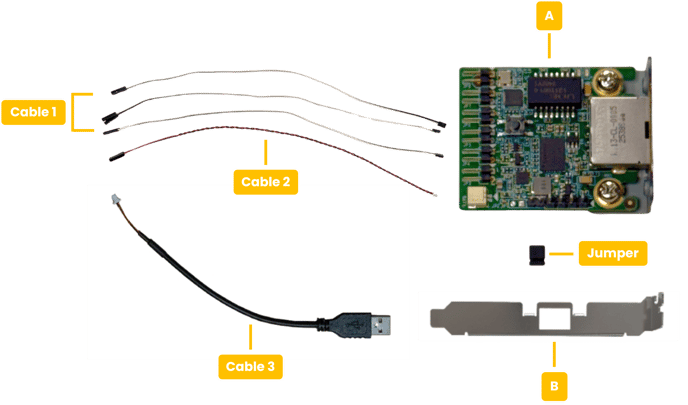
Before setting up your Allxon Ajax Plus OOB Enabler, make sure the following items are present in the package.
> Package List:
|
Label |
Description |
|
|
1 |
A |
OOB Enabler main board |
|
2 |
B | PCI-E bracket |
|
3 |
Cable 1* | Jumper wire |
|
4 |
Cable 2 | OOB Enabler power input (Jumper wire) |
|
5 |
Cable 3** |
OOB Enabler power input (USB type A) |
|
6 |
Jumper |
Device Power detection |
*Only includes two cords
**Not included but can be purchased
What You Will Need
The following content outlines the software and hardware required for the activation process of Allxon Ajax Plus OOB Enabler.
- Edge device: Supports ARM and x86 architectures.
- Desktop, laptop, or tablet: Used to connect to Allxon Portal to enable and activate OOB services. A web browser installation is required.
- Allxon Portal account: Visit "Sign Up, Activate, and Sign In" to learn how to register an Allxon Portal account.
- Internet connection: Ensure the edge device, OOB Enabler, and operating computer is connected to a stable network.
Hardware Wiring
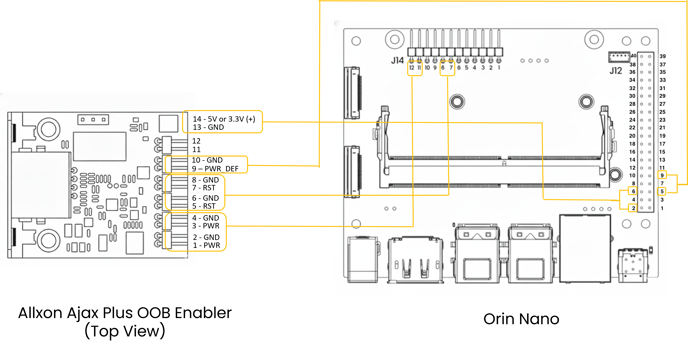
Wiring diagram for OOB Enabler main board.
ARM Architecture
|
Ajax Plus OOB Enabler |
Orin Nano Dev-Kit Pin Header |
|
|
Power Supply |
Pin 14 |
Pin 2 (J12) |
| Pin 13 |
Pin 6 (J12) |
|
|
Power Supply |
Micro USB to external USB Type A power input |
- |
| Ajax Plus OOB Enabler Main Board |
Orin Nano Dev-Kit Pin Header |
|
| Power Switch | Pin 2 or Pin 3 | Pin 12 (J14) |
|
Pin 1 or Pin 4 |
Pin 11 (J14) |
|
| Power Reset | Pin 5 or Pin 7 | Pin 8 (J14) |
| Pin 6 or Pin 8 | Pin 7 (J14) | |
| Enable Device Power Detection | Jumper | - |
| Power ON/OFF Detection | Pin 9 | Pin 5 (J12) |
| Pin 10 | Pin 9 (J12) |
x86 Architecture
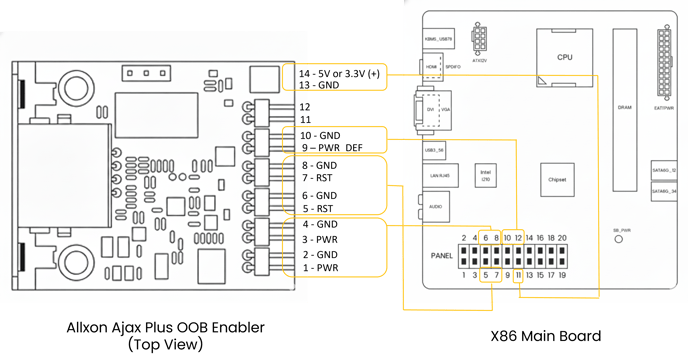
The following information provides wiring for x86-based device.
|
Ajax Plus OOB Enabler |
x86-Based Device Motherboard |
|
|
Power Supply |
Pin 14 |
Pin 11 |
| Pin 13 |
GND |
|
|
Power Supply |
Micro USB to external USB Type A power input |
- |
| Ajax Plus OOB Enabler Main Board |
x86-Based Device Panel Header |
|
|
Power Supply |
Pin 2 or Pin 3 | Pin 8 |
| Pin 1 or Pin 4 | Pin 6 | |
|
Power Reset |
Pin 5 or Pin 7 | Pin 7 |
| Pin 6 or Pin 8 | Pin 5 | |
| Enable Device Power Detection | Jumper | - |
| Power ON/OFF Detection | Pin 9 | Pin 10 |
| Pin 10 | Pin 12 |