![Allxon_Logo_Gradient-01-4.png]](https://www.allxon.com/hs-fs/hubfs/Allxon_Logo_Gradient-01-4.png?height=20&name=Allxon_Logo_Gradient-01-4.png)
Instruction
With selected devices from Allxon’s hardware partners, users can easily launch the Allxon Agent installation from the Desktop. Follow the steps below to install Allxon Agent.
<Environment> At your edge device.
Recommended OS*:
> Linux ARM64 (NVIDIA Jetson): L4T 35.1 to L4T 36.3
> Linux X86: Ubuntu 20.04, 22.04
* For support in other operating systems or versions, please contact us to confirm availability.
💡 Note
Already have Allxon Agent installed on your device?

Simply bring up Allxon Agent by pressing Ctrl + Shift + B and skip to
Get Device Pairing Code
Install Allxon Agent via Desktop Installer
- Navigate to the Desktop and Double-click the Allxon icon. (Selected devices only)
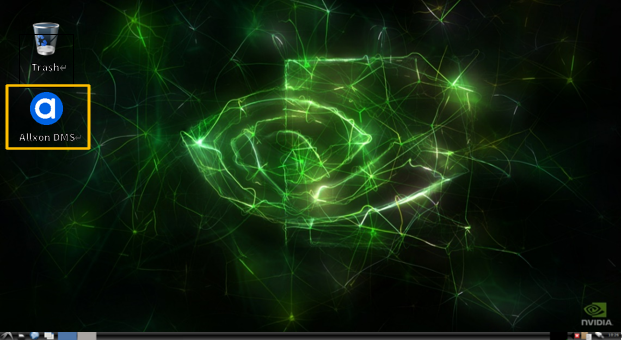
<💡 Note > Having trouble finding Allxon icon on the Desktop?Install Allxon Agent via Command Prompt to install Allxon Agent manually.
- To continue the installation process, press ‘Enter’ in the terminal.
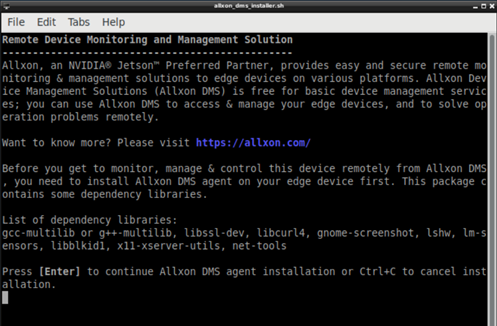
- Upon successful installation, Allxon Agent should start up automatically in 5 seconds.
If Allxon Agent does not start, please press Ctrl + Shift + B to start the agent.
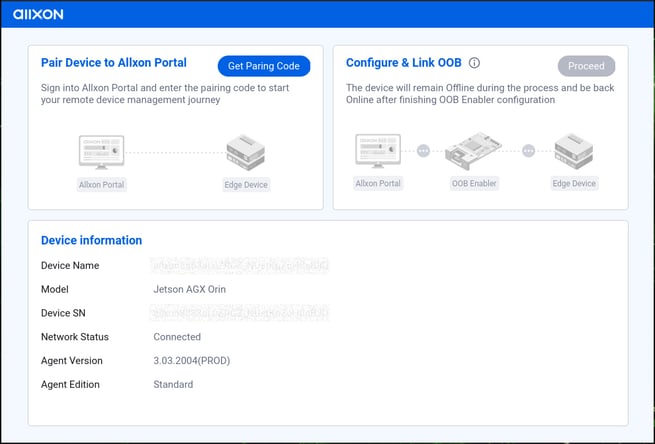
- Allxon Agent is now installed on your edge device. Proceed to Get Device Pairing Code to add your edge device onto Allxon Portal, and start managing now!
💡Note: If you’re unsure about the available commands or need guidance on the correct parameters, use the -h option to view a complete list of CLI commands and their descriptions. This can help you quickly find the correct usage.
-----------------------------------------------------------------------------
Library dependency list
List of library or package dependencies of Allxon Agent.
-
Linux ARM64 (NVIDIA Jetson): L4T 32.3.1 to L4T 36.3
-
Linux X86: Ubuntu 20.04, 22.04
|
Package |
Description |
||
|
1* |
libc6 | necessary libraries for executing Allxon Agent | |
|
2 |
libstdc++6 | ||
|
3 |
zlib1g | ||
|
4 |
coreutils |
basic Linux tools |
|
|
5 |
util-linux | ||
|
6 |
network-manager | network tools for OOB pairing and network information | |
|
7 |
dmidecode |
system information tool | |
|
8 |
tar |
data compression tool | |
| 9 | gnome-screenshot | tool for taking screenshot | |
| 10 | zip | file compress program |
* “gcc-multilib” and “g++-multilib” are the default packages in Ubuntu 18.04 (ARM), please ensure that either one of the packages is installed.
-----------------------------------------------------------------------------
Next article →